Webflow vs Framer comparison: which is right for you?

Webflow and Framer are two of the most powerful visual web design tools available today, but they serve very different users and goals. This guide breaks down their philosophies, CMS, SEO, animations, pricing, and migration to help you choose the right platform.
Webflow vs Framer comparison: which is right for you?
Choosing the right web design platform has become a crucial decision for modern creators. As visual development tools become more powerful and accessible, designers are increasingly faced with two standout options: Webflow and Framer. Each promises speed, flexibility, and theability to create stunning, interactive websites — but their approaches to achieving these goals differ significantly. In this article, we’ll break downtheir core philosophies, use cases, limitations, and value, helping you decidewhich is the best fit for your workflow and project needs.
Web design with Webflow and Framer
Both Webflow and Framer are modern webdesign tools that empower creators to build high-quality websites without relying entirely on traditional development teams. They offer visual design interfaces, animations, hosting, and CMS features — but they do so from fundamentally different angles, giving you the power to bring your vision tolife.
Webflow blends design with development logic. It mirrors the structure of code (HTML, CSS, JS), allowing designers to fine-tune every element with pixel-level precision. Framer, in contrast, feels more like a design playground — a canvas where creativity flows faster, idealfor a wide range of projects, including interactive UI work, product sites, andlanding pages.
Platform philosophy and target users
Framer was built with designers in mind —especially those coming from tools like Figma or Sketch. Its interface is clean, minimal, and intuitive, perfect for visually driven creators who want to build functional prototypes and websites fast, without worrying much about code.
Webflow, on the other hand, targets a hybrid user: the designer-developer. If you’re a designer who’s comfortable thinking like a developer — or even writing some code — Webflow rewards you with unmatched precision and scalability. It’s perfect for freelancers, agencies, or startups that need to build marketing sites, blogs, or scalable web platforms.
No-code vs code-centric tools
Framer markets itself as a no-code solution— and for many use cases, it lives up to that promise. You can build an entire site visually and even connect CMS collections without writing a single line of code. But when you want to go beyond the basics (custom interactions, external integrations), you may run into walls that require embedding custom React components or reaching into developer support.
Webflow walks a different line. It’s more code-centric, in the sense that its visual interface reflects how front-end code behaves. You don’t have to write code, but you will need to understand concepts like box model, positioning, z-index, breakpoints, and classes to useit effectively. That makes it more demanding — but also more powerful when creating production-level sites.
Migration between platforms
Switching between Framer and Webflow is not a seamless process due to their different design structures, features, and CMS models. Migrating a site from one to the other typically requires a partial rebuild. Let’s delve deeper into the specifics of migrating from Webflow to Framer and vice versa.
Webflow to Framer migration
If you’re migrating from Webflow to Framer, consider the following:
● Animations: Framer supports beautiful animations, but they’re set up differently. Webflow’s timeline-based system doesn’t translate directly.
● CMS: Webflow’s CMS is more advanced. While Framer has CMS collections, it’s currently more limited (e.g.fewer custom fields, simpler relationships).
● SEO: Webflow gives you more control over SEO settings like structured data, sitemap generation, and metafields, ensuring your website is fully optimized for search engines and potential visitors.
● Custom code: If your Webflow site uses a lot of embedded JavaScript or custom HTML, you’ll need to reworkthose in Framer.
Framer to Webflow migration
Going the other way, from Framer to Webflow, you’ll run into different issues:
● Component logic: Framer's component logic and props system won’t carry over.
● Real-time animations: Framer supports timeline and interaction-based animations that aren’t easily replicated in Webflow without custom code.
● Design responsiveness: While both tools are responsive-first, Framer’s fluid layout model feels more modern,while Webflow relies on breakpoints.
Overall, whichever direction you move, be prepared to rethink your animations, content structure, and layout behaviors.
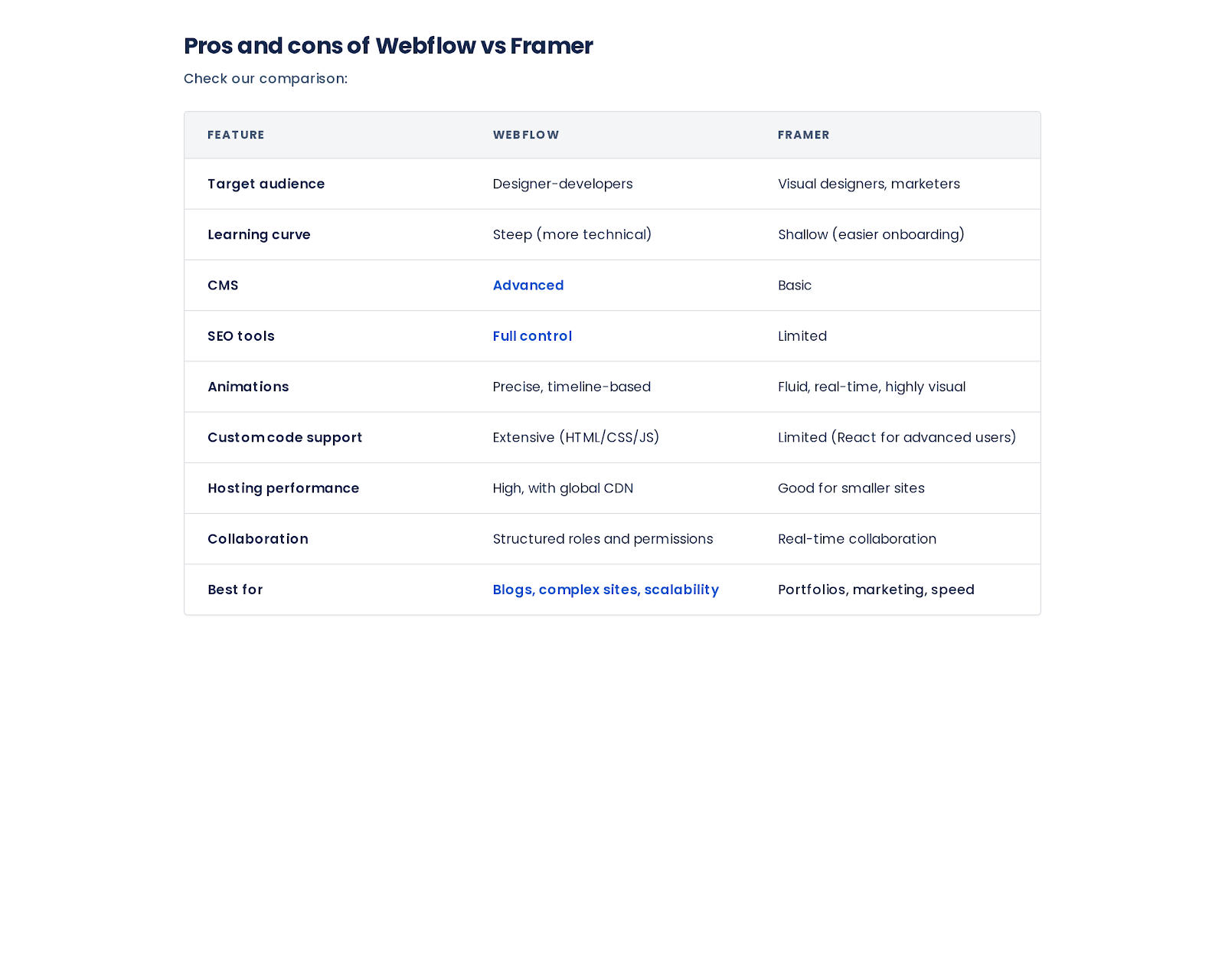
Design flexibility and collaboration
Both platforms offer excellent design flexibility, but the way they handle collaboration differs.
Framer offers live collaboration by default— just like Figma. Team members can work on the same project at the same time,making it feel like a true design tool. It’s fast, seamless, and intuitive, especially for creative teams.
Webflow is more structured: it separates designer and editor roles, and real-time collaboration is more limited. However, it provides version history, roles and permissions, and controlled publishing environments, making it more enterprise-ready.
SEO, performance, and CMS
If SEO and content scaling are important to your project, Webflow is the stronger choice. You can set meta tags, alt text, Open Graph settings, redirects, and generate automatic sitemaps. Plus, its CMS supports advanced structures and filtering.
Framer, while improving, offers as implified CMS and limited SEO tools. You can edit meta descriptions andtitles, but deeper control requires workarounds or custom code.
Performance-wise, both use global hosting and serve static pages, but Webflow has more tools for optimization — such asminified code, asset compression, and staging environments.
When to choose Webflow, and when Framer
If you’re working on a content-heavy website — like a blog, directory, or corporate site — and need SEO optimization, advanced CMS, or scalable hosting, go with Webflow.
If your focus is on speed, interactivity ,visual polish, and ease of collaboration — such as for a portfolio, landing page, or startup product page — Framer is an excellent choice.
Your team size and technical comfort also matter: Webflow rewards structure and experience, while Framer welcomesintuition and experimentation.
Frequently asked questions
Can I migrate my existing Webflow site to Framer?
Not directly. You'll likely need to rebuild key components and reconfigure CMS and animations manually.
Is Framer better than Webflowf or animations?
Yes, if you value fluidity and speed.Framer’s real-time preview and animation tools are more accessible for non-coders.
What are the biggestl imitations of each platform?
Framer lacks a powerful CMS and detailedSEO controls. Webflow has a steep learning curve and limited real-time collaboration.
Is there a free version ofFramer or Webflow available?
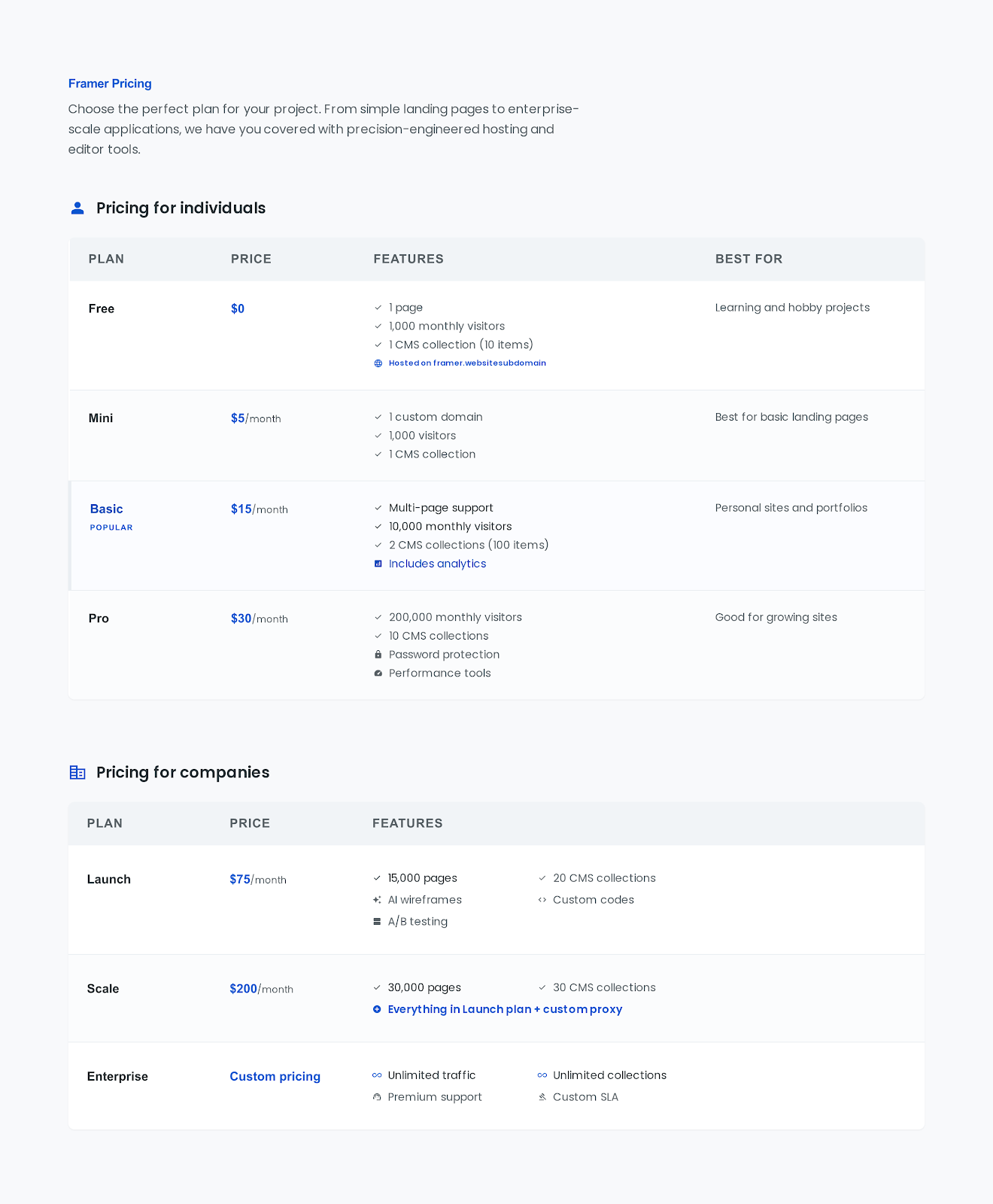
Yes. Both offer free tiers with limitations on pages, CMS, or custom domains.
Ultimately, your decision should come down to the type of project, your goals, and how your team prefers to work.